
44 · Python Runtime
Stage Hello RLM · v44-python-runtime
上一章我们把「执行模型代码」这件公共事务抽象成了 CodeRuntime:上层只认识 execute(code) → RuntimeResult 和 reset(),至于底下跑的是 JavaScript、Python 还是某个沙箱,调用方一概不关心。
但那一章我们只点亮了一台发动机——JavaScriptRuntime,它用 Node 的 vm 把 TypeScript 转译后跑在宿主进程里。问题立刻就来了:
- 模型如果更擅长写 Python(数据处理、科学计算、REPL 式探索),它生成的 Python 代码一个字都跑不了;
vm是单语言、进程内的,没法借到 Python 生态(pandas、标准库、本地脚本);- 更关键的是,
vm的超时是「同步循环被打断」,而真正生产级的代码执行往往是一个独立的进程。
这一章,我们给同一份
CodeRuntime契约装上第二台发动机:PythonRuntime——它用子进程跑 Python,把 stdout / stderr / 退出状态翻译回统一的RuntimeResult。
我们会做四件事:
- 复用上章的
CodeRuntime契约,新增PythonRuntime实现; - 把「子进程的 stdout / stderr / 退出码」翻译为同一份
RuntimeResult; - 用
__hr_main__()包装让用户代码能像 TypeScript 一样return结构化结果; - 把这条链路接进
hello --chat --code-runtime python,并支持真实模型生成 Python Code Action。
一、上一版存在什么问题?
上一章的 JavaScriptRuntime 已经能跑通「模型写代码 → Runtime 执行 → 结构化结果」的最小闭环,但它有三个绕不开的边界:
Model
  ↓ Code string
JavaScriptRuntime
  ↓ vm + 最小 console
RuntimeResult
问题是:
- 只有一个语言引擎:模型生成的 Python、Ruby、Shell 都跑不了,而很多数据/运维任务用 Python 写最自然;
- 进程内、单语言:
vm跑在 Node 主进程里,既拿不到 Python 生态,也没有真正的进程隔离; - 超时姿势单一:
vm只能打断同步死循环,对真正的「长时间运行 + 外部 I/O」无能为力。
如果 CodeRuntime 永远只有一台 JS 发动机,那它和「只绑定 Python」并没有本质区别——只是换了个语言。契约的价值,恰恰在于能并列长出多台发动机。
二、本篇解决什么问题?
本章不改动 CodeRuntime 接口一行,只新增一个实现:PythonRuntime。它把模型生成的 Python 代码,交给一个独立的 Python 解释器子进程执行:
Python source
      ↓ python3 -c(包裹 __hr_main__)
子进程 stdout / stderr / 退出码
      ↓ 翻译
RuntimeResult
它做三件具体的事:
- 语言无关契约不变:调用方还是
execute(code) → RuntimeResult;选 JavaScript 还是 Python,是实现的事(createCodeRuntime(language)按语言挑实现); - 子进程三要素翻译:stdout、stderr、退出状态,分别落到
RuntimeResult的对应字段; - 让
return能回传值:宿主把用户代码包进__hr_main__(),再用一行哨兵把返回值写回 stdout,执行成功后剥掉哨兵、解析出value。
仍然不注入任何 Capability:没有 fs、没有 shell、没有网络封装。模型此刻只能做内存计算——和上一章的 JS 发动机处于同一安全水位,只是语言换成了 Python。能力注入留给第 45 章。
三、先看最终效果
3.1 本地 Python 执行
先跑不需要 API Key 的确定性 demo:
$ node --import tsx examples/stage-5/44-python-runtime/demo.mts输出会展示四件事:
=== 44 · PythonRuntime:Python 子进程参考实现 ===
公共契约        : execute(code) → RuntimeResult;reset()
执行环境        : 独立 Python 解释器(一次执行一次退出);宿主把代码包进 __hr_main__() 以便用 return 回传值

Python Code Action(return 字典):
  python → completed · value={"count":3,"average":3333.3333333333335} · …ms
    stdout: {'services': ['api', 'worker', 'db'], 'average': 3333.3333333333335}

抛出异常被翻译为 RuntimeFailure:
  python → failed · ValueError: 故意抛错:演示失败如何收敛成 RuntimeResult · …ms
    stderr: Traceback (most recent call last):
  File "<string>", line 6, in <module>
  File "<string>", line 3, in __hr_main__
ValueError: 故意抛错:演示失败如何收敛成 RuntimeResult

同步死循环被 SIGKILL 收束:
  while True → failed · Python 执行超过 500ms,已强制终止子进程 · …ms
注意三点:
return出来的字典被收进了value,而print的内容留在stdout——和上一章 TypeScript 的console.log/return分工一致;- 抛出的
ValueError没有炸掉 Runtime,而是变成ok:false的RuntimeResult,错误摘要取自 traceback 的最后一行; - 死循环不再靠
vm的同步超时,而是靠杀掉子进程(SIGKILL)来收束。
3.2 真实模型生成并执行 Python Code Action
复制 .env.example 为 .env 并配置一个 OpenAI 兼容端点后,显式加 --live:
$ node --import tsx --env-file-if-exists=.env examples/stage-5/44-python-runtime/demo.mts --live这个 demo 只发起一次模型调用。系统提示要求模型:只返回 Python、在内存里准备 timeout 样本、按 service 聚合求平均、print 一行 JSON 摘要并 return 汇总字典。随后我们把返回文本直接交给 PythonRuntime。
一次真实验证中,模型生成了聚合程序,Runtime 返回:
{
  "ok": true,
  "stdout": "{'services': ['api', 'worker', 'db'], 'average': 3333.3333333333335}",
  "stderr": "",
  "value": { "count": 3, "average": 3333.3333333333335 },
  "durationMs": 764
}
若模型返回不合法代码(语法错误、缩进错误、越界异常),失败也会按 RuntimeResult 原样展示,而不是悄悄吞掉。
--live是显式开关,避免读者随手运行 demo 时无意产生模型调用费用。
3.3 在 hello --chat 里体验
独立 demo 证明链路能跑之后,把它接进 CLI:
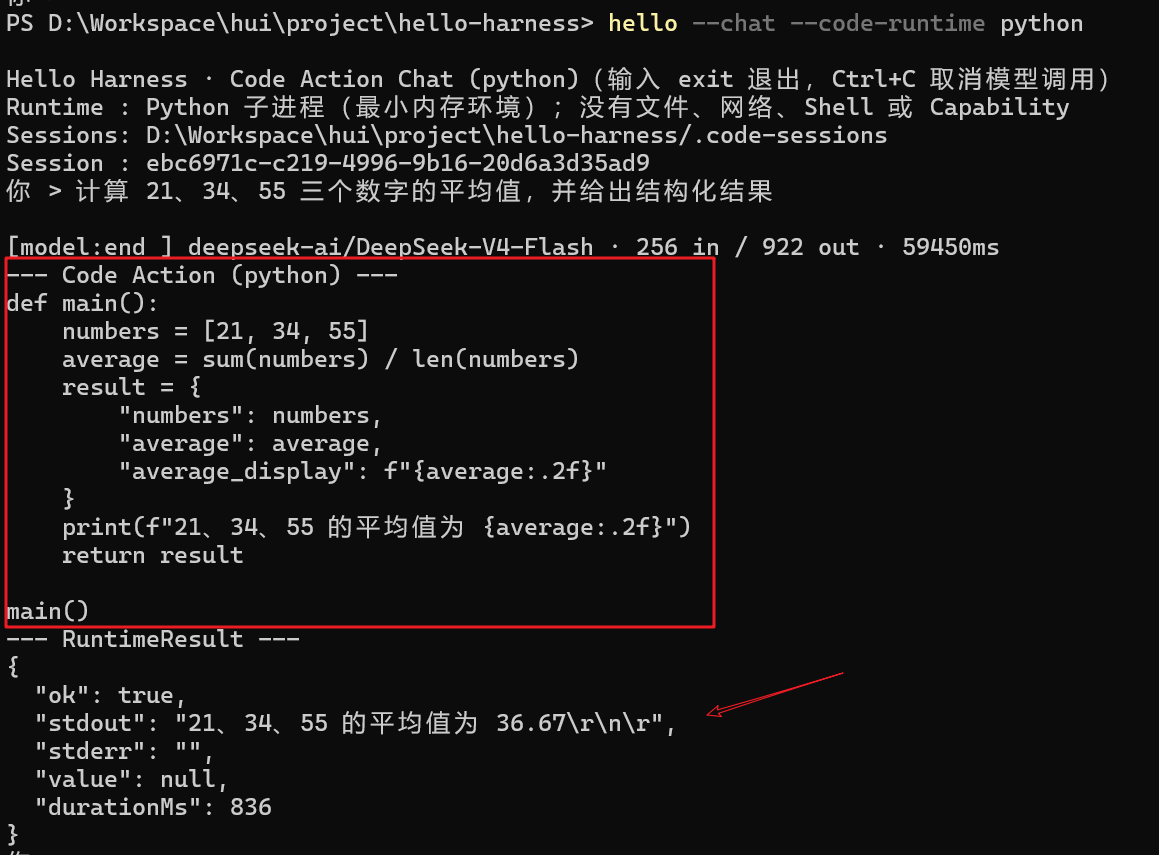
$ hello --chat --code-runtime python这会进入与上一章同构的 Code Action Chat 循环,只是模型这轮只返回 Python,CLI 用 PythonRuntime 执行。例如输入:
你 > 计算 21、34、55 三个数字的平均值,并给出结构化结果一次真实运行得到:
--- Code Action (python) ---
def main():
    numbers = [21, 34, 55]
    average = sum(numbers) / len(numbers)
    result = {
        "numbers": numbers,
        "average": average,
        "average_display": f"{average:.2f}"
    }
    print(f"21、34、55 的平均值为 {average:.2f}")
    return result

main()
--- RuntimeResult ---
{
  "ok": true,
  "stdout": "21、34、55 的平均值为 36.67\r\n\r",
  "stderr": "",
  "value": null,
  "durationMs": 836
}
可选参数与上一章完全一致:
--code-runtime typescript | javascript | python  # 选择模型输出语言(必须配合 --chat 或 --resume)
--code-timeout <ms>                              # 单段 Code Action 最长执行时间,默认 1000ms
Code Action Chat 仍使用独立的 .code-sessions/、不支持 --tui,原因是上一章讲过的:它有自己的最小循环,不能把旧的 Tool Message 混进无 Tool Schema 的代码对话。
四、架构变化:同一份契约,第二台发动机
现在的主链路是:
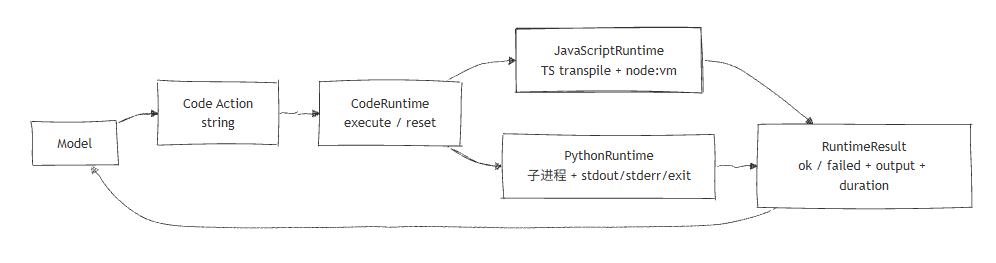
目录只多了一个实现文件,契约和包结构都没变:
packages/code-runtime/src/
  ├── runtime.ts        # CodeRuntime / RuntimeResult(上章)
  ├── javascript.ts     # JavaScriptRuntime 参考实现(上章)
  ├── python.ts         # 新增:PythonRuntime 参考实现
  └── index.ts          # 导出 + createCodeRuntime(language) 工厂
code-runtime 依旧不依赖 core、ai 或 coding。新增的 createCodeRuntime(language, options) 是个很薄的工厂:上层只说「我要 python」,工厂负责挑出 PythonRuntime;说「我要 typescript」,工厂挑出 JavaScriptRuntime。调用方始终拿着一个 CodeRuntime,不知道背后是哪台发动机。
五、核心抽象
5.1 契约完全复用
CodeRuntime 接口一字未改:
export interface CodeRuntime {
  execute(code: string): Promise<RuntimeResult>;
  reset(): Promise<void>;
}这正是上一章坚持「语言是实现的属性,不是接口参数」的回报:PythonRuntime 和 JavaScriptRuntime 并列实现同一个接口,CLI 用工厂二选一,未来再加 RubyRuntime、SandboxRuntime 也不碰调用方。
5.2 子进程三要素 → RuntimeResult
RuntimeResult 的字段含义对两台发动机完全一致:
| 字段 | JavaScriptRuntime | PythonRuntime |
|---|---|---|
stdout | 捕获的 console.log | 捕获的子进程 stdout |
stderr | 捕获的 console.warn/error | 捕获的子进程 stderr(含 traceback) |
value | async IIFE 的 return | __hr_main__() 的 return |
error | 异常摘要 | 退出码非 0 时的错误摘要(traceback 末行) |
durationMs | Date.now() 差值 | Date.now() 差值 |
失败不是未处理异常,而是一种可以记录、展示并反馈给模型的正常结果——这条原则从 Tool Result 延续到 Code Result,再到两台 Runtime,始终不变。
5.3 让 Python 也能 return:hr_main 包装
Python 的“顶层”不能写 return,而我们希望模型像写 TypeScript 那样用 return 回传结构化结果。做法是在用户代码外包一层函数:
import json, sys
def __hr_main__():
<用户代码,整体缩进 4 空格>
__hr_result = None
try:
    __hr_result = __hr_main__()
except BaseException as __hr_e:
    import traceback
    traceback.print_exc()
    sys.exit(1)
sys.stdout.write("\n__HARNESS_RESULT__" + json.dumps(__hr_result))
执行成功时,返回值被 json.dumps 后,紧跟哨兵 __HARNESS_RESULT__ 写回 stdout。宿主在拿到 stdout 后:
- 把哨兵之前的内容当作用户真正的
stdout; - 把哨兵之后的内容
JSON.parse成value。
这样模型写的 return {...} 就能对称地变成 RuntimeResult.value,和 TypeScript 发动机的体验完全一致。若模型没 return,value 为 undefined,也不报错。
5.4 超时:杀掉进程,而不是打断循环
同步死循环在 vm 里靠 timeout 参数打断;在子进程里则靠定时器 + child.kill("SIGKILL"):
const timer = setTimeout(() => {
  done({ kind: "timeout" });
  child.kill("SIGKILL");
}, timeoutMs);
这意味着只要超时,子进程一定被强制结束——既不会永久挂住 demo,也为未来真正的「取消传播」埋了第一颗种子(虽然此刻 I/O 取消仍不完整,见第九节)。
六、第二台发动机:PythonRuntime
6.1 找得到解释器吗?
不同机器上 Python 命令可能是 python3 也可能是 python。Runtime 默认依次尝试 python3 → python,只有全部找不到时才返回一条友好的 RuntimeFailure:
const commands = this.command ? [this.command] : ["python3", "python"];
for (const command of commands) {
  const outcome = await runProcess(command, script, this.timeoutMs, output);
  if (outcome.kind === "spawn-error") {
    if (command === commands[commands.length - 1]) {
      return finish({ ok: false, stdout: "", stderr: "", error: `找不到可用的 Python 解释器:${outcome.message}` });
    }
    continue; // 试下一个命令
  }
  // ...翻译为成功或失败
}
6.2 跨平台编码的坑:强制 UTF-8
这是一个容易被忽略、却会让中文全变乱码的细节:在 Windows 上,Python 子进程的 stdout/stderr 默认按系统locale(如 GBK)编码,而宿主按 UTF-8 读取,于是 ValueError 的中文信息会变成一堆问号。
解决方式是在 spawn 时强行把 Python 切到 UTF-8 模式:
const child = spawn(command, ["-X", "utf8", "-c", script], {
  stdio: ["ignore", "pipe", "pipe"],
  env: { ...process.env, PYTHONIOENCODING: "utf-8" },
});
-X utf8 让解释器整体走 UTF-8,再显式设 PYTHONIOENCODING 兜底 I/O 编码。这样无论是模型返回的报错信息,还是 print 的中文摘要,都能原样回到 RuntimeResult。
6.3 退出状态 → 成功 / 失败
子进程正常退出(码 0)就当作成功;非 0 就当作失败,错误摘要优先取 stderr 的最后一行(恰好是 ExceptionType: message):
function extractError(stderr: string, code: number): string {
  const lines = stderr.split("\n").map((l) => l.trim()).filter(Boolean);
  const last = lines[lines.length - 1];
  return last ? last : `Python 进程以退出码 ${code} 结束`;
}
异常分支里我们故意 traceback.print_exc() 后 sys.exit(1),于是 stderr 保留了完整堆栈,既方便排错,又不让错误摘要丢失上下文。
6.4 node:vm 不是沙箱,子进程也不是
上章的警告这里同样成立,而且更重要:子进程比 vm 多了一层进程隔离,但它看得见本机文件系统和网络。如果模型写 open('/etc/passwd'),在标准 Python 环境里是真的能读到的。
所以当前 PythonRuntime 依旧通过「不注入任何 Capability」来缩小攻击面:没有文件系统 API、没有 shell 封装、没有网络封装。真正的安全边界要靠第 45 章的受控 Capability 注入,或生产级的容器 / 远程执行服务来补齐。
6.5 完整实现
接下来是python解释器的完整实现 @code-runtime/src/python.ts
import { spawn } from "node:child_process";
import type { CodeRuntime, RuntimeFailure, RuntimeResult, RuntimeSuccess } from "./runtime";

export interface PythonRuntimeOptions {
  /** 子进程入口命令;默认优先 `python3`,失败再回退 `python`。 */
  command?: string;
  /** 单段 Code Action 最长执行时间,超时直接杀掉子进程。 */
  timeoutMs?: number;
}

const RESULT_MARKER = "__HARNESS_RESULT__";

type RuntimeResultInput = Omit<RuntimeSuccess, "durationMs"> | Omit<RuntimeFailure, "durationMs">;

type RunOutcome =
  | { kind: "spawn-error"; message: string }
  | { kind: "ok" }
  | { kind: "timeout" }
  | { kind: "exit"; code: number };

function formatError(error: unknown): string {
  return error instanceof Error ? error.message : String(error);
}

function buildScript(userCode: string): string {
  const indented = userCode
    .split("\n")
    .map((line) => (line.length > 0 ? "    " + line : line))
    .join("\n");

  return [
    "import json, sys",
    "def __hr_main__():",
    indented,
    "__hr_result = None",
    "try:",
    "    __hr_result = __hr_main__()",
    "except BaseException as __hr_e:",
    "    import traceback",
    "    traceback.print_exc()",
    "    sys.exit(1)",
    `sys.stdout.write("\\n${RESULT_MARKER}" + json.dumps(__hr_result))`,
  ].join("\n");
}

function splitResult(rawStdout: string): { stdout: string; value: unknown } {
  const markerIndex = rawStdout.indexOf(RESULT_MARKER);
  if (markerIndex === -1) return { stdout: rawStdout, value: undefined };
  const stdout = rawStdout.slice(0, markerIndex).replace(/\n$/, "");
  const payload = rawStdout.slice(markerIndex + RESULT_MARKER.length);
  let value: unknown = undefined;
  try {
    value = JSON.parse(payload);
  } catch {
    value = undefined;
  }
  return { stdout, value };
}

function extractError(stderr: string, code: number): string {
  const lines = stderr.split("\n").map((line) => line.trim()).filter(Boolean);
  const last = lines[lines.length - 1];
  return last ? last : `Python 进程以退出码 ${code} 结束`;
}

function runProcess(command: string, script: string, timeoutMs: number, output: { stdout: string; stderr: string }): Promise<RunOutcome> {
  return new Promise((resolve) => {
    let settled = false;
    const done = (outcome: RunOutcome) => {
      if (settled) return;
      settled = true;
      resolve(outcome);
    };

    const child = spawn(command, ["-X", "utf8", "-c", script], {
      stdio: ["ignore", "pipe", "pipe"],
      env: { ...process.env, PYTHONIOENCODING: "utf-8" },
    });

    const timer = setTimeout(() => {
      done({ kind: "timeout" });
      child.kill("SIGKILL");
    }, timeoutMs);

    child.stdout?.setEncoding("utf8").on("data", (chunk: string) => {
      output.stdout += chunk;
    });
    child.stderr?.setEncoding("utf8").on("data", (chunk: string) => {
      output.stderr += chunk;
    });

    child.on("error", (error) => {
      clearTimeout(timer);
      done({ kind: "spawn-error", message: formatError(error) });
    });

    child.on("close", (code) => {
      clearTimeout(timer);
      if (!settled) {
        if (code === 0) done({ kind: "ok" });
        else done({ kind: "exit", code: code ?? 1 });
      }
    });
  });
}

/**
 * 用 Python 子进程执行模型生成的 Code Action 的参考实现。
 *
 * 这一版是「一次执行,一次退出」:每段代码起一个全新的解释器进程,结束后变量
 * 不保留(持久状态留给第 46 章 Persistent Runtime)。子进程的 stdout / stderr /
 * 退出状态被翻译回统一的 `RuntimeResult`。
 *
 * 为了让模型像 TypeScript 那样用 `return` 返回结构化结果,宿主把用户代码包进
 * `__hr_main__()` 再调用,并在末尾用哨兵行 `__HARNESS_RESULT__<json>` 把返回值
 * 写回 stdout;执行成功后我们从 stdout 里剥掉这一行,剩下的交给上层。
 */
export class PythonRuntime implements CodeRuntime {
  private readonly command?: string;
  private readonly timeoutMs: number;

  constructor(options: PythonRuntimeOptions = {}) {
    this.command = options.command;
    this.timeoutMs = options.timeoutMs ?? 1_000;
  }

  async execute(code: string): Promise<RuntimeResult> {
    const startedAt = Date.now();
    const output = { stdout: "", stderr: "" };
    const finish = (result: RuntimeResultInput): RuntimeResult => ({
      ...result,
      durationMs: Date.now() - startedAt,
    });

    if (code.trim() === "") {
      return finish({ ok: false, stdout: "", stderr: "", error: "代码不能为空" });
    }

    const script = buildScript(code);
    const commands = this.command ? [this.command] : ["python3", "python"];

    for (const command of commands) {
      const outcome = await runProcess(command, script, this.timeoutMs, output);

      if (outcome.kind === "spawn-error") {
        if (command === commands[commands.length - 1]) {
          return finish({ ok: false, stdout: "", stderr: "", error: `找不到可用的 Python 解释器:${outcome.message}` });
        }
        continue;
      }

      if (outcome.kind === "ok") {
        const { stdout, value } = splitResult(output.stdout);
        return finish({ ok: true, stdout, stderr: output.stderr, value });
      }

      if (outcome.kind === "timeout") {
        return finish({ ok: false, stdout: output.stdout, stderr: output.stderr, error: `Python 执行超过 ${this.timeoutMs}ms,已强制终止子进程` });
      }

      return finish({ ok: false, stdout: output.stdout, stderr: output.stderr, error: extractError(output.stderr, outcome.code) });
    }

    return finish({ ok: false, stdout: "", stderr: "", error: "找不到可用的 Python 解释器" });
  }

  async reset(): Promise<void> {
    // 本章是一次性子进程,执行结束进程即退出;Persistent Runtime 会在第 46 章覆写这一语义。
  }
}
6.6 code-chat 系统提示词
我们在code-chat.ts中,提供了 CodeAsAction 的能力集成,那么大模型如何知道是要生成一段代码来执行相关动作的呢? 核心就在于提示词,我们这里新装了一个Python的执行引擎,所以对应的系统提示词也需要相应的改造,一个简单的实现方式如下
function codeSystemPrompt(language: RuntimeLanguage): string {
  const isPython = language === "python";
  const languageLabel = isPython ? "Python" : language === "typescript" ? "TypeScript" : "JavaScript";
  const printName = isPython ? "print" : "console.log";
  const envNote = isPython
    ? "没有 process、文件、网络、Shell、环境变量或任何外部 Capability;可用标准 Python 内存计算。"
    : "没有 process、require、Buffer、文件、网络、Shell、环境变量或任何外部 Capability。";
  return `你是一个 Code Action Agent。每一轮都必须只输出一段可直接执行的 ${languageLabel} 代码:不要 Markdown 围栏、不要解释、不要 import 或 export。

运行环境只有 ${printName} 以及标准内存计算能力;${envNote}

要求:
- 用代码完成用户的问题;可使用变量、函数、循环、条件(${languageLabel} 支持的 async 也可按需使用);
- 用 ${printName} 输出面向用户的简洁结论;
- 用 return 返回结构化结果;
- 若上轮 assistant 消息带有 [RuntimeResult],把它视作上一段 Code Action 的执行观察,并据此继续;
- 不要尝试访问不存在的环境能力。`;
}
七、真实模型体验:从文本到可运行 Python Code Action
7.1 一次性体验:demo.mts
demo.mts 的关键代码很短:
const model = createOpenAIModel();
const response = await model.generate({
  messages: [systemMessage("只输出可执行 Python 代码"), userMessage("生成 timeout 审计程序")],
});

const code = extractCode(response.content);
const runtime = new PythonRuntime({ timeoutMs: 1_000 });
const result = await runtime.execute(code);
它复用现有的 @hello-harness/ai Provider 抽象;code-runtime 自己不 import OpenAI。换成别的 OpenAI 兼容端点、Anthropic 或本地模型时,只需替换 Model 层,执行 Runtime 不动。
体验时可以故意改用户任务,观察两种结果:
- 模型正确生成代码:看
stdout与value; - 模型生成不合法或越界的代码:看
RuntimeFailure.error与stderr。
7.2 日常模式:接入 hello --chat 的 Code Action Chat
CLI 侧不需要为 Python 另写一套循环——code-chat.ts 通过工厂按语言挑发动机,系统提示也随语言切换(Python 用 print、提醒 return):
const runtime = createCodeRuntime(options.language, { timeoutMs: options.codeTimeoutMs ?? 1_000 });


// @code-runtime/index.ts 文件中,实现按语言的Runtime返回
/** 按语言选择并构造对应的 CodeRuntime 实现,上层无需认识具体类。 */
export function createCodeRuntime(language: RuntimeLanguage, options: CreateCodeRuntimeOptions = {}): CodeRuntime {
  if (language === "python") {
    return new PythonRuntime({ timeoutMs: options.timeoutMs, command: options.command });
  }
  return new JavaScriptRuntime({ language, timeoutMs: options.timeoutMs });
}
观察回写、会话隔离(.code-sessions/)、withGuard 守卫、--code-runtime 必须配合 --chat/--resume 等边界,都与上一章的 TypeScript 模式完全一致;差别只在「底下跑的是哪台发动机」。
这正是 CodeRuntime 契约想要的效果——换引擎不换循环。
八、新架构解决了什么?
- 契约长出第二台发动机:同一份
CodeRuntime,JavaScriptRuntime与PythonRuntime并列实现、独立替换; - 子进程三要素被翻译:stdout / stderr / 退出状态,收敛为和 JS 发动机同构的
RuntimeResult; - Python 也能
return:__hr_main__()包装 + 哨兵行,让结构化结果对称地回到value; - 结果可观察且一致:成功、异常、超时(SIGKILL)都收敛为
RuntimeResult,错误摘要取自 traceback 末行; - 跨平台编码已处理:
-X utf8+PYTHONIOENCODING让中文不再变乱码; - 换引擎不换循环:CLI 用工厂挑实现,Code Action Chat 的系统提示、观察回写、会话隔离全部复用;
- 安全面仍然小:当前只给标准 Python 内存环境,没有文件、网络或 Shell,真实模型无法直接触及本机。
九、它又引入了什么问题?
这一版已经真的能跑 Python 了,但离 Coding Agent 的实际代码执行环境还有距离:
- 子进程不是安全沙箱:Python 看得见本机文件系统和网络,
open()真实可读,绝不能当执行攻击者代码的生产方案; return依赖包装:模型必须return才能拿到value,顶层表达式不会自动成为结果;这层__hr_main__()包装是教学取舍,不是 Python 的天然语义;- 没有 Capability:模型代码还不能受控调用 workspace 文件、Shell、Git、搜索或 Skill;
vm不是安全沙箱(旧债仍在):上一章的 JavaScriptRuntime 同样没解决不可信代码问题;- 超时不等于完全取消:同步循环会被 SIGKILL,但已发起的外部 I/O 是否被真正中止,仍取决于子进程内部;
- 没有持久状态:每次
execute起一个全新解释器,变量不会跨执行保留; - 依赖本机 Python:环境没装解释器时只能返回友好的
RuntimeFailure,无法降级到其他发动机; - 尚末接入既有
AgentRuntime:Code Action Chat 仍走自己的最小循环,两种 Runtime 的统一编排还要靠后续 RLM 章节继续收束。
十、下一章
我们已经有了一份不绑定语言的 CodeRuntime 契约,也有了 JavaScript / TypeScript 与 Python 两台参考发动机。但这两台发动机现在都只给模型「内存计算」——没有文件、没有 Shell、没有 Git。
下一章就给 Runtime 装上能力空间:把 fs、shell、git、search 这些受控 Capability 注入到执行环境里,让模型写的代码可以直接调用它们。
CodeRuntime
   ├── JavaScriptRuntime   # 上章:TS transpile + vm
   └── PythonRuntime       # 本章:Python 子进程
          ↓ 下一章注入能力
   fs / shell / git / search / skills / agents
第 45 章会回答一个关键问题:能力该以什么形式「注入」给代码,又不让模型越界?——是全局变量、是显式 import,还是一套受权限门约束的 API?这正是 Capability Runtime 要定义的边界。
尽信书则不如,以上内容纯属一家之言,因个人能力有限,难免有疏漏和错误之处,如发现 bug 或者有更好的建议,欢迎批评指正,不吝感激 🙃
欢迎点赞、关注公众号「一灰灰Blog」 我们 ch45 见真章
微信公众号: 一灰灰Blog