
15 · Event System
Stage Hello Harness · v15-events
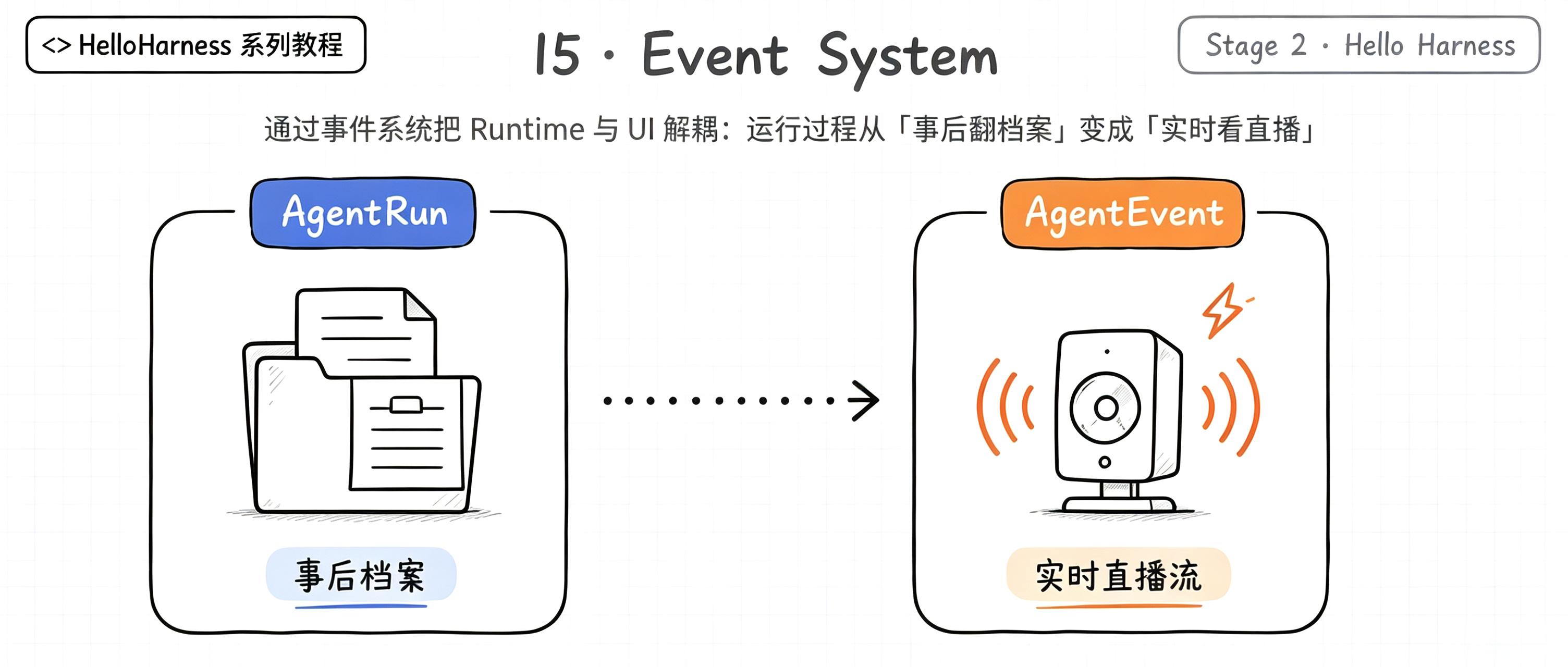
上一章我们有了 AgentRun——运行结束后的一份完整档案。但档案有个天生的毛病:
它是「事后」才有的。
运行正在进行时,谁想看直播?没人。模型在思考的那几秒里,UI 只能干等。这一章,我们给 Runtime 装上一个广播喇叭:
runtime.on("run:start",  ...);   // 开工了
runtime.on("model:start", ...);  // 开始思考
runtime.on("model:end",   ...);  // 思考完了
runtime.on("tool:start",  ...);  // 开始动手
runtime.on("tool:end",    ...);  // 动手完毕
runtime.on("step",        ...);  // 又记了一步
runtime.on("run:end",     ...);  // 收工了
一、上一版存在什么问题?
13 章、14 章之后,CLI 是这么干活的:
const run = await runtime.run(request);   // 全程静默,跑完才返回
for (const step of run.steps) { ... }     // 然后才逐行打印
问题就藏在这两行之间:
- Runtime 和 UI 长在一起:
run()只管闷头跑,UI 想要进度只能等它回来翻档案——运行期间屏幕一动不动; - UI 想看过程 = 读完档再画:所有
steps是运行结束后才有,想「边跑边显示」根本做不到; - Runtime 不知道谁在看它:打印的职责其实混在调用方里,Runtime 对「有没有人观察我」一无所知——它和观众是绑死的;
- 想加第二个观众(比如一边打印、一边计 token、一边写日志)就得再循环一遍 steps——观众一多,代码就要复制。
一句话:现在的模型是 「哑巴演出」——演员(Runtime)台上演完,台下观众(UI)只能等散场后看录像。
二、本篇解决什么问题?
- 定义一套
AgentEvent:运行全生命周期的广播消息; - 给
AgentRuntime装上一个小型事件发射器:on()订阅、emit()广播; - 让 Runtime 与 UI 彻底解耦:Runtime 只负责「发出发生了什么」,观众(UI / 日志 / 监控)各订各的。
核心心智模型:
AgentRun是运行结束后的档案,AgentEvent是运行过程中的直播流。
解决完上面三件事,咱们回过头把这条线串一下:上一章留下的「运行进行中屏幕不动、Runtime 和 UI 绑死、加观众得复制代码」这些遗留问题 → 这一章用「AgentEvent 广播 + AgentEventEmitter 订阅 + Runtime 只喊不打印」解决掉 → 接下来看看我们到底得到了什么收获。
解决之后,我们收获了什么?
- 运行可实时观察:UI 能边跑边渲染,直播取代了录像回放;
- Runtime 与 UI 解耦:Runtime 一行打印代码都没有,加日志、加监控、加计费全是新增订阅者,不用改 Runtime;
- 一套事件无限观众:同一个
step事件,CLI 渲染、Eval 打分、审计记录各听各的,互不干扰; - 类型安全的订阅:订哪个事件,回调参数就自动收窄到那一支,不会拿到牛头不对马嘴的数据。
一句话收个尾:遗留的「哑巴演出」问题被这一章的抽象解决掉,换来的则是「实时、解耦、可扩展、类型安全」四笔实实在在的收获
三、先看最终效果
CLI 现在边跑边打——每个字都是事件实时驱动的:
$ pnpm dev -- --tools "6 乘 7 等于多少?"

> hello-harness@0.1.0 dev D:\Workspace\hui\project\hello-harness
> node --import tsx --env-file-if-exists=.env src/index.ts "--tools" "6 乘 7 等于多少?"

Run ID  : ab876c96-5343-4567-863e-92f7f867870b
Input   : 6 乘 7 等于多少?
Step 1 · model  → 调用工具:calculator
Step 2 · tool   → calculator({"expression":"6 * 7"}) = {"ok":true,"value":42}
Step 3 · model  → 完成回答
Step 4 · finish → finished
Answer  : 6 乘 7 等于 42。
Steps   : 2 轮 · 5 条消息 · 4 步 · 4976ms
Status  : completed (finished)
而你想听完整场「直播」?挂上全类型监听器:
$ node --env-file-if-exists=.env --import tsx -e "
import { AgentRuntime } from './src/runtime.ts';
import { createOpenAIModel } from './src/model/openai.ts';
import { ToolRegistry } from './src/tool/registry.ts';
import { calculator } from './src/tool/calculator.ts';
import { systemMessage, userMessage } from './src/messages.ts';

const registry = new ToolRegistry();
registry.register(calculator);
const runtime = new AgentRuntime(createOpenAIModel(), registry);

runtime.on('run:start', (e) => console.log('[run:start]', e.input));
runtime.on('model:start', () => console.log('[model:start] 思考中'));
runtime.on('model:end', (e) => console.log('[model:end]', e.durationMs + 'ms'));
runtime.on('tool:start', (e) => console.log('[tool:start]', e.call.name));
runtime.on('tool:end', (e) => console.log('[tool:end]', e.call.name, '=', JSON.stringify(e.result)));
runtime.on('run:end', (e) => console.log('[run:end]', e.status, e.stopReason));

await runtime.run({ messages: [systemMessage('你是助手'), userMessage('6 乘 7 等于多少?')] });
"输出是一串按真实时序滚动的事件:
[run:start] 6 乘 7 等于多少?
[model:start] 思考中
[model:end] 60ms
[tool:start] calculator
[tool:end] calculator = {"ok":true,"value":42}
[model:start] 思考中
[model:end] 6ms
[run:end] completed finished
Runtime 一行 console.log 都没有——它只负责喊,听不听、怎么听,全在观众。
四、架构变化
src/
├── events.ts     # 扩展:AgentEvent 联合 + AgentEventEmitter(on/off/emit)
├── runtime.ts    # run() 每个节点发事件;暴露 on/off
├── step.ts       # 不变
└── index.ts      # CLI 改为订阅事件渲染(不再事后翻 steps)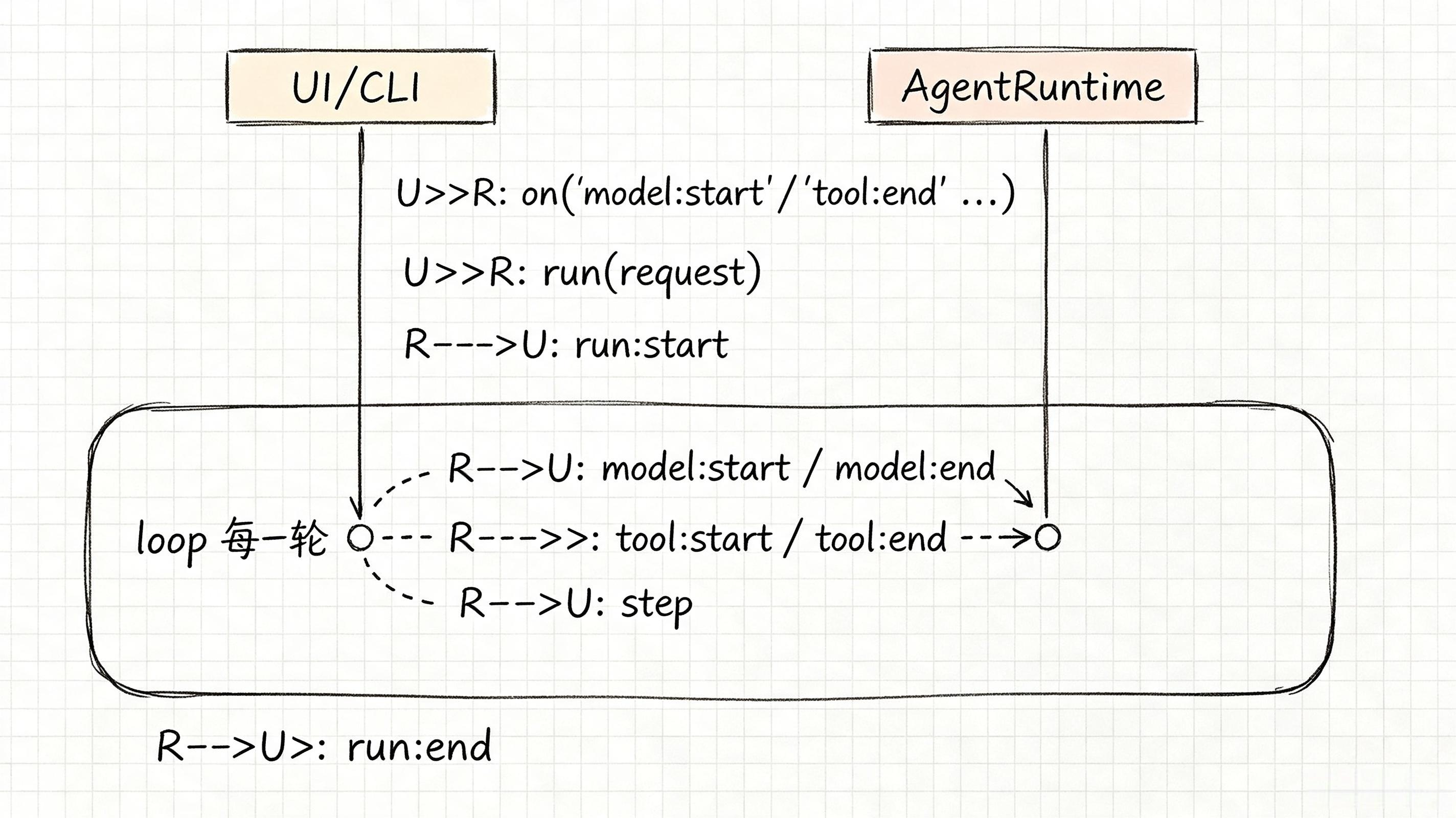
Runtime 不认识 UI,UI 也不认识 Runtime 的实现——它们只认识事件。
老架构和新架构,小伙伴可以对照着看——同样是「让外面看见运行过程」,写法差出一套广播系统:
| 维度 | 上一版:哑巴演出 | 这一版:广播直播 |
|---|---|---|
| 运行看得见吗 | 全程静默,跑完才翻档 | 边跑边广播,实时直播 |
| Runtime 与 UI | 绑死,打印混在调用方 | 解耦,Runtime 只喊、观众各订 |
| 加第二个观众 | 再循环一遍 steps,复制代码 | 多挂一个 on,不动 Runtime |
| 多任务串台吗 | 单 run 还好,多 run 难分 | 每条事件带 runId,分得清 |
| 订阅类型安全吗 | 拿到事件自己 if 判别 | on 按类型自动收窄 |
一句话:以前是「演员台上闷头演,观众散场看录像」;现在是「装了喇叭,谁想听自己订,还带字幕(类型)」。
注:Runtime 与观众之间只靠事件通信,正是规划里那张图——UI 订阅事件渲染、Runtime 只管
emit,双方互不知晓实现。
五、核心抽象
在看具体的设计实现之前,先把「怎么想到这么设计」摊开讲讲,我们的思考方式,还是「先钉需求、再拆角色、最后克制边界」三步:
- 钉需求:14 章的
AgentRun是事后档案,运行进行中屏幕一动不动;Runtime 和 UI 绑死,想加第二个观众(日志、监控、计费)就得再循环一遍steps复制代码。需求就一句:「让运行过程能被实时观察,且 Runtime 不认识观众」; - 拆角色:把「发生了什么」抽象成一套
AgentEvent联合(全生命周期的广播消息);用一个AgentEventEmitter(on/off/emit)做类型安全的喇叭;Runtime 只负责emit,观众只负责on; - 克制边界:不依赖 Node 自带
EventEmitter,自己写最小且类型安全的实现;每条事件都带runId以便多 run 分流;Runtime 内部零打印,观察职责完全外移给订阅者。
出发点小结:我们不是「为解耦而解耦」,而是被「哑巴演出、观众绑死、加人复制代码」三个真实痛点逼出来的。
依然沿用先教学、后抽象扩展的思路——这一章,我们先把「事件」这套广播机制立住,错误模型、事件总线那些大词后面再讲。
下面把这套广播机制摊开,瞅一瞅
AgentEvent:一套广播消息
export type AgentEvent =
  | { type: "run:start";  runId: string; input: string }
  | { type: "model:start"; runId: string; request: ModelRequest }
  | { type: "model:end";   runId: string; response: ModelResponse; durationMs: number }
  | { type: "tool:start";  runId: string; call: ToolCall }
  | { type: "tool:end";    runId: string; call: ToolCall; result: ToolResult; durationMs: number }
  | { type: "step";        runId: string; step: AgentStep }
| { type: "run:end"; runId: string; status: RunStatus; stopReason: StopReason; answer: string; durationMs: number };| 事件 | 含义 | 典型观众 |
|---|---|---|
run:start | 开工,附来路 | CLI 打标题 |
model:start / model:end | 思考开始/结束,附耗时 | 转圈动画 / 计费 |
tool:start / tool:end | 动手开始/结束,附结果与耗时 | 进度条 / 审计 |
step | 又记了一步(时间线) | 时间线渲染 / Eval |
run:end | 收工,附结局 | 汇总统计 |
每条事件都带 runId——一个 Runtime 同时跑多个 run,观众也能分清谁是谁。
AgentEventEmitter:一个会分类的小喇叭
不依赖 Node 的 EventEmitter,我们写一个类型安全的最小实现:
export class AgentEventEmitter {
  private readonly listeners = new Map<AgentEvent["type"], Listener[]>();

  on(type, listener) { /* 按类型登记观众 */ }
  off(type, listener) { /* 取消登记 */ }
  emit(event) { /* 按 event.type 喊一嗓子 */ }
}重点关注:亮点在 on 的签名——按类型自动收窄:
runtime.on("tool:end", (e) => {
  // 这里 e 已经被收窄成 ToolEndEvent,直接用 e.call / e.result / e.durationMs
});
订阅 "tool:end",回调里的 e 就自动是 tool:end 那一支,不用手动 if 判别。
Runtime:装喇叭 + 主动喊
export class AgentRuntime {
  private readonly events = new AgentEventEmitter();

  on(type, listener) { this.events.on(type, listener); }
  off(type, listener) { this.events.off(type, listener); }

  async run(request) {
    this.events.emit({ type: "run:start", runId: id, input });
    // ...
    this.events.emit({ type: "model:start", runId: id, request });
    response = await this.model.generate(request);
    this.events.emit({ type: "model:end", runId: id, response, durationMs });
    // ...
    this.events.emit({ type: "tool:start", runId: id, call });
    result = await this.registry.execute(call);
    this.events.emit({ type: "tool:end", runId: id, call, result, durationMs });
    // ...
    this.events.emit({ type: "run:end", runId: id, status, stopReason, answer, durationMs });
  }
}
run() 的骨架没变——只是在每个节点多喊一嗓子 抛个事件出去。
六、实现代码
Event事件定义
src/events.ts——事件联合 + 发射器:
import type { ModelRequest, ModelResponse, ToolCall } from "./model/types";
import type { ToolResult } from "./tool/tool";
import type { AgentStep } from "./step";
import type { RunStatus, StopReason } from "./runtime";

export type ModelEvent =
  | { type: "content"; text: string }
  | { type: "usage"; inputTokens: number; outputTokens: number };

export type AgentEvent =
  | { type: "run:start"; runId: string; input: string }
  | { type: "model:start"; runId: string; request: ModelRequest }
  | { type: "model:end"; runId: string; response: ModelResponse; durationMs: number }
  | { type: "tool:start"; runId: string; call: ToolCall }
  | { type: "tool:end"; runId: string; call: ToolCall; result: ToolResult; durationMs: number }
  | { type: "step"; runId: string; step: AgentStep }
  | { type: "run:end"; runId: string; status: RunStatus; stopReason: StopReason; answer: string; durationMs: number };

export type AgentEventListener = (event: AgentEvent) => void;

export class AgentEventEmitter {
  private readonly listeners = new Map<AgentEvent["type"], AgentEventListener[]>();

  on<T extends AgentEvent["type"]>(type: T, listener: (event: Extract<AgentEvent, { type: T }>) => void): void {
    const list = this.listeners.get(type) ?? [];
    list.push(listener as AgentEventListener);
    this.listeners.set(type, list);
  }

  off<T extends AgentEvent["type"]>(type: T, listener: (event: Extract<AgentEvent, { type: T }>) => void): void {
    const list = this.listeners.get(type);
    if (!list) return;
    this.listeners.set(type, list.filter((l) => l !== listener));
  }

  emit(event: AgentEvent): void {
    for (const listener of [...(this.listeners.get(event.type) ?? [])]) {
      listener(event);
    }
  }
}
on用Extract<AgentEvent, { type: T }>收窄回调参数类型,emit时再as还原成AgentEventListener存库——对外类型安全,对内统一处理。
AgentRuntime实现Event上报
src/runtime.ts——装喇叭 + 各节点喊话(节选):
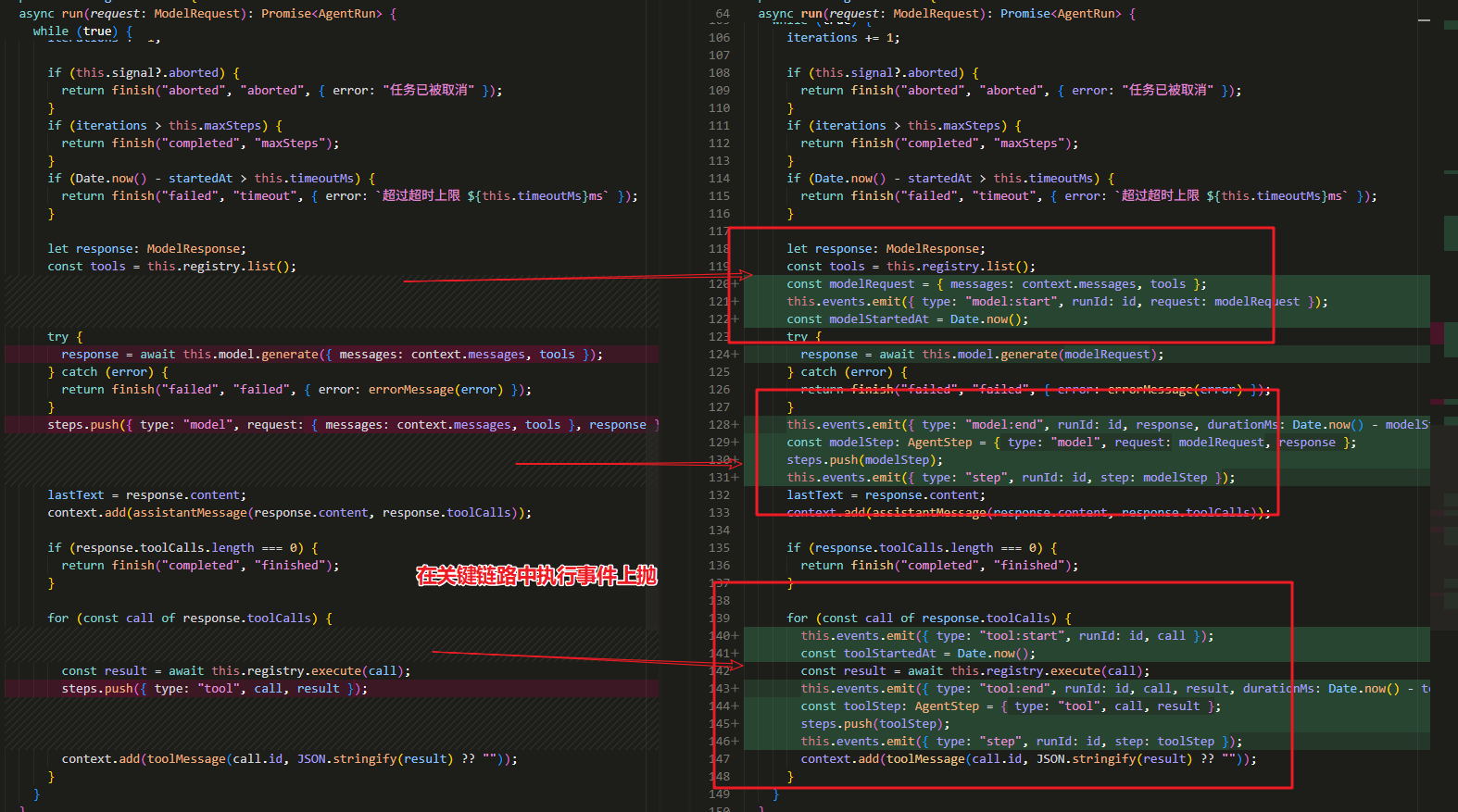
export class AgentRuntime {
  private readonly events = new AgentEventEmitter();

  on<T extends AgentEvent["type"]>(...) { this.events.on(type, listener); }
  off<T extends AgentEvent["type"]>(...) { this.events.off(type, listener); }

  async run(request) {
    this.events.emit({ type: "run:start", runId: id, input });
    // 模型前后
    this.events.emit({ type: "model:start", runId: id, request: modelRequest });
    response = await this.model.generate(modelRequest);
    this.events.emit({ type: "model:end", runId: id, response, durationMs });
    // 工具前后
    this.events.emit({ type: "tool:start", runId: id, call });
    result = await this.registry.execute(call);
    this.events.emit({ type: "tool:end", runId: id, call, result, durationMs });
    // 收尾
    this.events.emit({ type: "run:end", runId: id, status, stopReason, answer, durationMs });
  }
}
应用层适配
src/index.ts——CLI 从「翻档案」改为「听直播」:
async function runAgentDemo(model: Model, request: ModelRequest, options: { maxSteps?: number; timeoutMs?: number }) {
  const runtime = new AgentRuntime(model, registry, options);
  let stepCount = 0;

  // 1. 注册事件监听器
  runtime.on("run:start", (e) => {
    console.log(`Run ID  : ${e.runId}`);
    console.log(`Input   : ${e.input}`);
  });
  runtime.on("step", (e) => {
    stepCount += 1;
    const n = stepCount;
    const s = e.step;
    if (s.type === "model") {
      console.log(
        s.response.toolCalls.length > 0
          ? `Step ${n} · model  → 调用工具:${s.response.toolCalls.map((c) => c.name).join(", ")}`
          : `Step ${n} · model  → 完成回答`,
      );
    } else if (s.type === "tool") {
      console.log(`Step ${n} · tool   → ${s.call.name}(${JSON.stringify(s.call.arguments)}) = ${JSON.stringify(s.result)}`);
    } else if (s.type === "finish") {
      console.log(`Step ${n} · finish → ${s.stopReason}`);
    } else {
      console.log(`Step ${n} · error  → ${s.stopReason} ${s.message}`);
    }
  });

  // 开始agent执行调用
  const run = await runtime.run(request);

  // 结尾汇总仍可用 run 档案
  const elapsedMs = run.endedAt - run.startedAt;

  console.log(`Answer  : ${run.answer}`);
  console.log(`Steps   : ${run.iterations} 轮 · ${run.history.length} 条消息 · ${stepCount} 步 · ${elapsedMs}ms`);
  console.log(`Status  : ${run.status} (${run.stopReason})${run.error ? ` · ${run.error}` : ""}`);
}
七、运行 Demo
接下来进入正题,正确的使用姿势如下,小伙伴跟着跑两遍就懂了:
# 1. 事件驱动的实时 CLI
pnpm dev -- --tools "6 乘 7 等于多少?"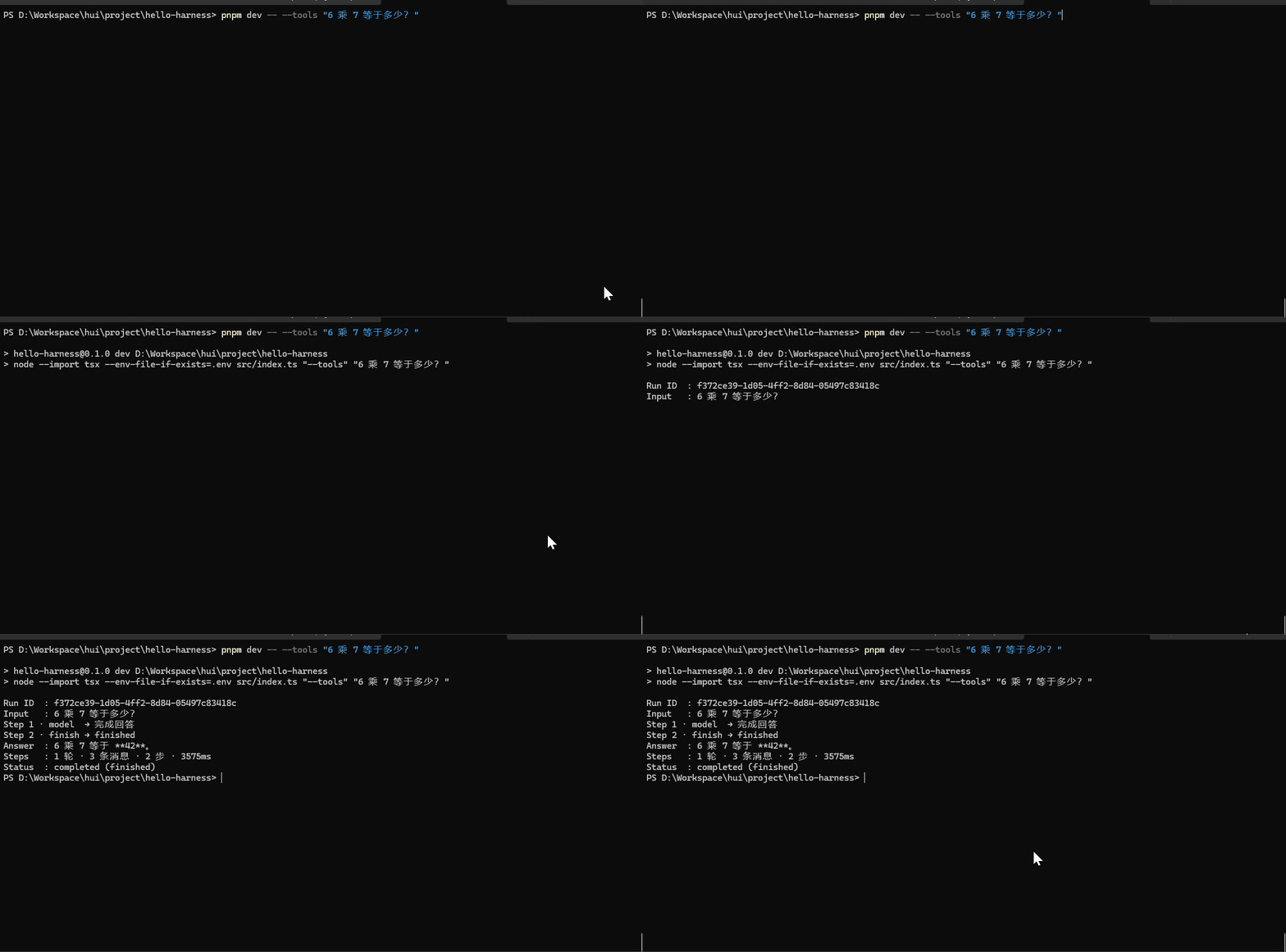
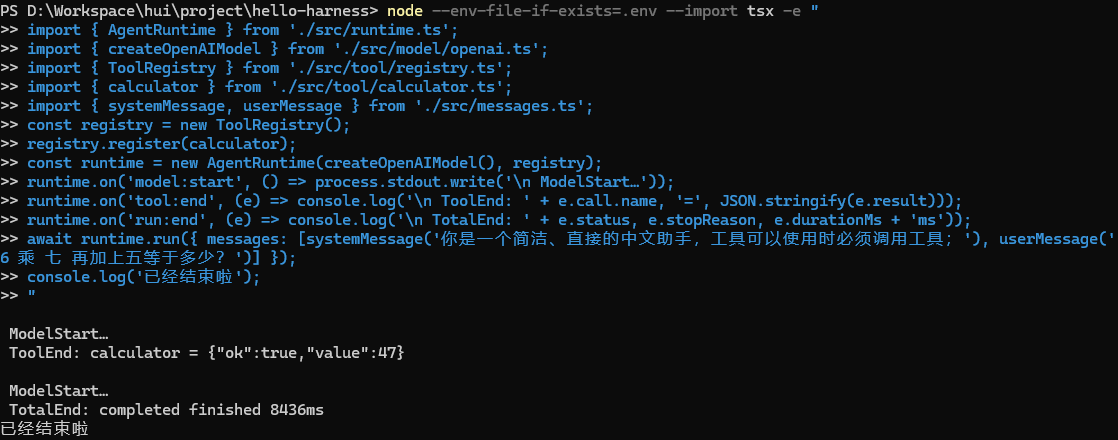
我们也可以直接写个demo,来验证下按需订阅事件
# 2. 全类型监听器直播一场运行
node --env-file-if-exists=.env --import tsx -e "
import { AgentRuntime } from './src/runtime.ts';
import { createOpenAIModel } from './src/model/openai.ts';
import { ToolRegistry } from './src/tool/registry.ts';
import { calculator } from './src/tool/calculator.ts';
import { systemMessage, userMessage } from './src/messages.ts';
const registry = new ToolRegistry();
registry.register(calculator);
const runtime = new AgentRuntime(createOpenAIModel(), registry);
runtime.on('model:start', () => process.stdout.write('\n ModelStart…'));
runtime.on('tool:end', (e) => console.log('\n ToolEnd: ' + e.call.name, '=', JSON.stringify(e.result)));
runtime.on('run:end', (e) => console.log('\n TotalEnd: ' + e.status, e.stopReason, e.durationMs + 'ms'));
await runtime.run({ messages: [systemMessage('你是一个简洁、直接的中文助手,工具可以使用时必须调用工具;'), userMessage('6 乘 七 再加上五等于多少?')] });
console.log('已经结束啦');
"
八、新架构解决了什么?
- 运行可实时观察:UI 能边跑边渲染,思考时画转圈、工具时打进度——直播取代了录像回放;
- Runtime 与 UI 解耦:Runtime 一行打印代码都没有,观众再多也不改 Runtime——加日志、加监控、加计费,全是新增订阅者;
- 一套事件,无限观众:同一个
step事件,CLI 渲染、Eval 打分、审计记录各听各的,互不干扰; - 按类型收窄的类型安全:订阅哪个事件,回调参数就自动是哪一支,不会拿到牛头不对马嘴的数据;
- runId 分流:一个 Runtime 并发跑多个任务,事件流也不会串台。
九、它又引入了什么问题?
AgentEvent 给运行过程装上了实时直播,可这套「广播」本身,又悄悄埋下了哪些新坑?
- 事件有重复信息:
model:end和step(model)都带着模型响应,tool:end和step(tool)同理——同一件事喊了两遍; - 谁在监听,Runtime 不知道:观众订阅了但一直没
off,长期运行会监听器越积越多(内存隐患); - 广播是同步的:
emit是同步 for 循环,一个监听器抛异常会打断整条事件链——错误隔离还没做; - 没有事件总线:事件只在 Runtime 内部广播,跨进程、跨模块(比如从工具层发事件)还做不到——事件该属于谁这个问题没解决;
- 事件与错误还没挂钩:出错时只发
run:end,错误本身的模型(类型、可重试性)依然缺席——正是下一章。
十、下一章
本章小结:这一章给 Runtime 装上了广播喇叭——
AgentEvent把「发生了什么」抽象成全生命周期的广播消息,AgentEventEmitter提供类型安全的on/off/emit,Runtime 从此只管「发出发生了什么」、零打印,观众(UI / 日志 / 监控)各订各的。我们立住了贯穿本章的心智模型:AgentRun 是事后档案,AgentEvent 是实时直播流。从此,运行过程从「哑巴演出」变成了「谁想听谁订阅」的解耦直播。
下章预告
16 · Error Model——给错误一个类型与身份,而不是一律 throw:
export type HarnessError =
  | ModelError | ToolError | RuntimeError | ContextError | PermissionError;
记住一句话:
错误不是「什么都没发生」,错误是一种有类型、有边界、可处理的正常状态。
那么问题来了——事件让我们「看得见」运行过程了,可一旦出错,现在还只丢一句笼统的 run:end,错误本身既没有类型、也没有边界、更分不清能不能重试,怎么把「看得见」升级成「分得清」?
欢迎点赞、关注公众号「一灰灰Blog」,下一章,咱们给错误做一套完整的户籍制度 😊
微信公众号: 一灰灰Blog